Chapter 2 of Azure OpenAI Essentials is where the book shifts from the theoretical overview of LLMs into the practical reality of working with Azure OpenAI as a platform. If Chapter 1 was “what are large language models,” Chapter 2 is “here’s how Microsoft packages them for you — and here’s how to talk to them.”
These are my notes on the core principles that stood out.
Azure OpenAI vs. OpenAI — why the distinction matters
A common question: why use Azure OpenAI instead of the OpenAI API directly? The book makes a clear case. Azure OpenAI gives you the same foundational models (GPT-4, GPT-4o, etc.) but wraps them inside the Azure ecosystem. That means:
- Enterprise identity and access control through Azure Active Directory (Entra ID) — no more sharing API keys in Slack channels.
- Network isolation with private endpoints and VNets — the model endpoint doesn’t have to be publicly accessible.
- Regional data residency — you choose where your data is processed, which matters for GDPR and other compliance frameworks.
- Content filtering built in by default — Azure applies a safety layer on top of the base model.
The takeaway: if you’re building anything beyond a side project, especially in an enterprise or regulated environment, the Azure layer isn’t overhead — it’s the point.
The resource model: resource → deployment → model
One of the most important things Chapter 2 clarifies is the Azure OpenAI resource hierarchy:
- Azure OpenAI Resource — created in a specific Azure region, under a subscription and resource group. This is your entry point.
- Model Deployment — within that resource, you deploy a specific model (e.g.,
gpt-4o,text-embedding-ada-002) under a deployment name you choose. - API Calls — your code targets the deployment name, not the model name directly.
This indirection is intentional. It lets you swap the underlying model version without changing your application code — you just redeploy a newer model version to the same deployment name. That’s a powerful operational pattern.
Azure Subscription
  └── Resource Group
        └── Azure OpenAI Resource (e.g., West Europe)
              ├── Deployment: "my-gpt4" → gpt-4o (version 2024-08-06)
              └── Deployment: "my-embeddings" → text-embedding-ada-002
Authentication: keys vs. Entra ID
The book covers two authentication methods:
- API Keys — simple, fast for development. Each resource gets two keys that you can rotate independently.
- Microsoft Entra ID (Azure AD) — token-based, role-based access. This is what you should use in production.
With Entra ID, you assign the Cognitive Services OpenAI User role to the identity (user, service principal, or managed identity) that needs access. No keys stored in config files, no secrets to leak.
from azure.identity import DefaultAzureCredential
from openai import AzureOpenAI

credential = DefaultAzureCredential()
token = credential.get_token("https://cognitiveservices.azure.com/.default")

client = AzureOpenAI(
    azure_endpoint="https://my-resource.openai.azure.com/",
    azure_ad_token=token.token,
    api_version="2024-06-01"
)
If you’re using Managed Identity on an Azure VM, App Service, or Container App, this just works — no credential management at all.
The API surface: completions, chat, and embeddings
Chapter 2 breaks down the main API endpoints you’ll interact with:
Chat Completions
This is the primary endpoint for conversational AI. You send a list of messages with roles (system, user, assistant) and get a response back.
response = client.chat.completions.create(
    model="my-gpt4",  # your deployment name
    messages=[
        {"role": "system", "content": "You are a helpful assistant."},
        {"role": "user", "content": "What is Azure OpenAI?"}
    ],
    temperature=0.7,
    max_tokens=500
)

print(response.choices[0].message.content)
Key parameters the book highlights:
| Parameter | What it does |
|---|---|
temperature | Controls randomness. 0 = deterministic, 1 = creative. |
max_tokens | Caps the response length. Important for cost control. |
top_p | Nucleus sampling — an alternative to temperature. Use one or the other, not both. |
frequency_penalty | Reduces repetition of tokens already used. |
presence_penalty | Encourages the model to talk about new topics. |
stop | Sequence(s) where the model should stop generating. |
Embeddings
Embeddings convert text into dense vector representations. These are the backbone of semantic search, RAG (retrieval-augmented generation), and recommendation systems.
response = client.embeddings.create(
    model="my-embeddings",
    input="Azure OpenAI provides enterprise-grade AI capabilities."
)

vector = response.data[0].embedding  # list of floats
The book emphasizes that embeddings are not optional knowledge — if you want to build anything involving document search or grounding LLM responses in your own data, you need to understand how these work.
Tokens and pricing: know what you’re paying for
A principle the book drives home: think in tokens, not characters. Tokens are the fundamental unit of input and output. A rough rule of thumb for English text is 1 token ≈ 4 characters or ¾ of a word.
Why it matters:
- You’re billed per token (input and output separately).
- Each model has a context window — the total number of tokens it can process in a single request (prompt + response combined).
- If your prompt is too long, you’ll hit the limit and the request will fail.
To make this concrete, here’s a snapshot from my own Azure OpenAI deployment — a gpt-4.1-mini model running over the past week:
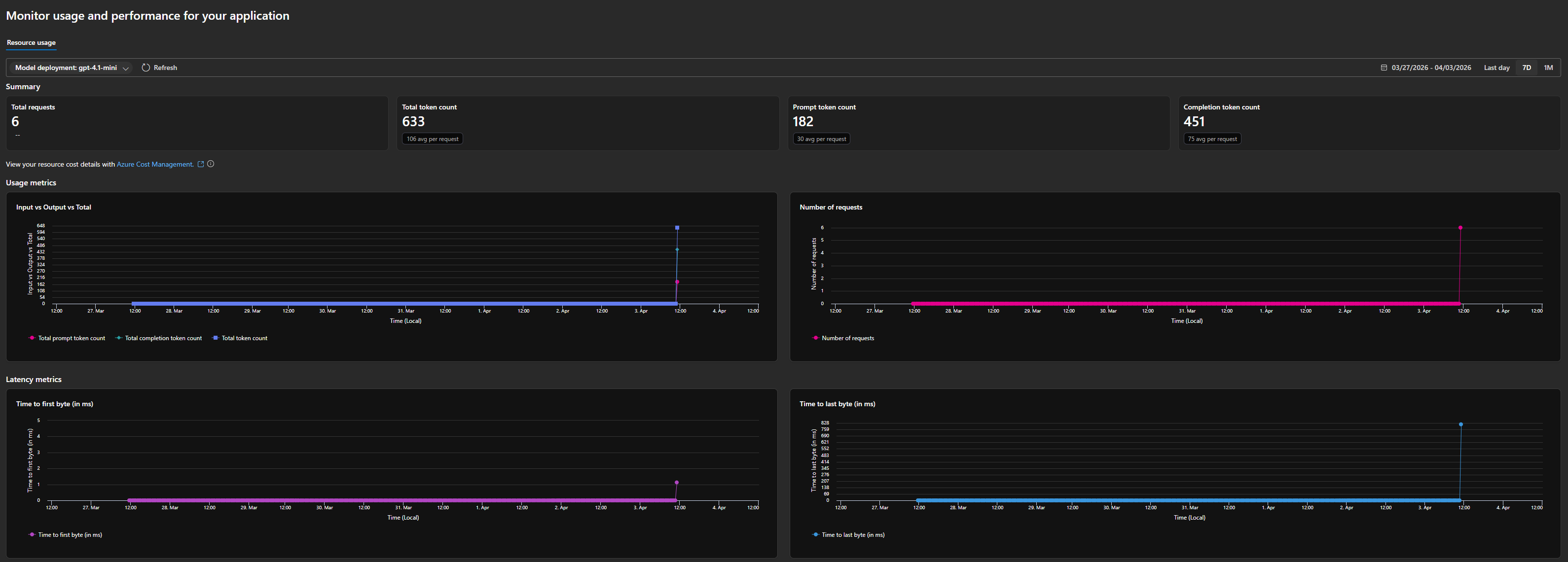
In just 6 requests, the deployment consumed 633 total tokens — broken down into 182 prompt tokens (30 avg per request) and 451 completion tokens (75 avg per request). That means the model’s output was roughly 2.5x the size of the input on average. This is typical for conversational completions where a short prompt generates a longer response.
The dashboard also shows latency metrics — time to first byte and time to last byte. For lightweight requests like these, latency stayed low, but these numbers become critical when you’re building user-facing applications where responsiveness matters.
The book recommends using the tiktoken library to count tokens before sending requests:
import tiktoken

encoding = tiktoken.encoding_for_model("gpt-4o")
tokens = encoding.encode("How many tokens is this sentence?")
print(len(tokens))  # 7
This is especially relevant when building systems that inject context (like retrieved documents) into prompts — you need to know how much room you have left.
Quotas and throttling: the rate limit reality
Azure OpenAI uses a Tokens-Per-Minute (TPM) quota system. Each deployment gets a TPM allocation, and both input and output tokens count against it. If you exceed your quota, you get HTTP 429 responses.
Looking at the usage charts from my own deployment, you can see how token consumption spikes when requests come in — even a small burst of 6 requests generated 633 tokens. At scale, these numbers add up fast, which is exactly why monitoring matters.
The book’s practical advice:
- Request quota increases early — the default quotas are conservative.
- Implement exponential backoff in your client code.
- Use provisioned throughput for production workloads with predictable traffic — it gives you dedicated capacity instead of shared.
- Monitor your usage dashboard — Azure gives you real-time visibility into token counts, request volumes, and latency. Use it.
Content filtering: on by default
Unlike the raw OpenAI API, Azure OpenAI applies content filters to both inputs and outputs by default. The filters check for:
- Hate and fairness
- Sexual content
- Violence
- Self-harm
Each category is rated at severity levels (safe, low, medium, high), and the default configuration blocks medium and above. You can customize filter configurations, but you can’t fully disable them — this is an enterprise guardrail by design.
The book flags this as something developers often discover the hard way: a prompt that works fine on OpenAI’s API might get blocked on Azure OpenAI because of these filters. Test early.
My takeaways
Chapter 2 is dense but essential. The core principles I’m taking forward:
- Use Entra ID, not API keys, from the start — even in development if you can. It builds the right habits.
- The deployment abstraction is your friend — decouple your code from specific model versions.
- Count your tokens — especially when building RAG pipelines or anything that injects context.
- Respect the rate limits — design for throttling, don’t treat it as an edge case.
- Test against the content filters early — they’re stricter than you might expect.
Next up: Chapter 3 — Azure OpenAI Advanced Topics, where the book gets into fine-tuning, function calling, and the Assistants API. That’s where things get really interesting.